Term's And Condition
Updated: 12 Dec 2024
3
In today’s online world, the Internet connects everyone and everything together. A website is like a special place you can visit on the Internet. It’s made up of different pages that you can look at
But what exactly is a website? In this article, we’ll explain it
We’ll discuss what makes up a website, including its pages and what they do. Whether you’re new to the Internet or just want to learn more, come with us to explore what websites are all about.
What is Website?
Imagine you need to find information about a specific computer problem. You turn on your laptop, open a web browser like Google Chrome, and type your question in the search bar. Hitting enter takes you to a variety of websites offering you multiple solutions. Each website is a collection of interlinked web pages dedicated to a particular topic.
There is no competitor in the world, but you yourself! This is very deep to understand. Hopefully, you can by the will of Allah. Engr Ghulam Abbas











Lorem ipsum dolor sit, amet consectetur adipisicing elit. Quidem nemo deserunt omnis voluptate corporis tempore natus alias ad itaque consectetur. Dignissimos illum fuga magni at sint tenetur aspernatur distinctio nisi. Lorem ipsum dolor sit, amet consectetur adipisicing elit. Consequatur minima in dolor mollitia, earum voluptatum culpa eius enim rerum, nulla, ullam ipsam. Facilis atque facere minima, eos officiis enim harum?
Lorem ipsum dolor sit amet consectetur, adipisicing elit. Fugiat quos perferendis vero, impedit architecto earum cumque in ab voluptate qui possimus, distinctio, voluptas quia id repellendus maiores soluta itaque iusto.
Lorem ipsum dolor sit amet consectetur adipisicing elit. Dolore, aliquid iusto, placeat distinctio atque at, aut recusandae ex ipsum voluptate eos animi error rem quam. Sunt itaque nulla neque repudiandae?
- Educational (universities, tutorials, courses)
- News (national, local, niche)
- Informational
- Entertainment (gaming, music, streaming)
- Nonprofit (charities, NGOs, foundations)
- Personal (portfolios, blogs, resumes)
- Government
HTML (HyperText Markup Language) is the standard language for creating web pages. It provides the structure of a webpage using elements like headings, paragraphs, lists, and more.HTML, CSS, and JavaScript are the foundational technologies for building web pages. Together, they create engaging, interactive, and visually appealing websites. This article covers the basics and advanced aspects of each technology, along with practical examples.
- Educational (universities, tutorials, courses)
- News (national, local, niche)
- Informational
- Entertainment (gaming, music, streaming)
- Nonprofit (charities, NGOs, foundations)
- Personal (portfolios, blogs, resumes)
- Government
Key Components of a Website
Introducing the key components of a website: When you browse the internet, you interact with various elements that make up a website
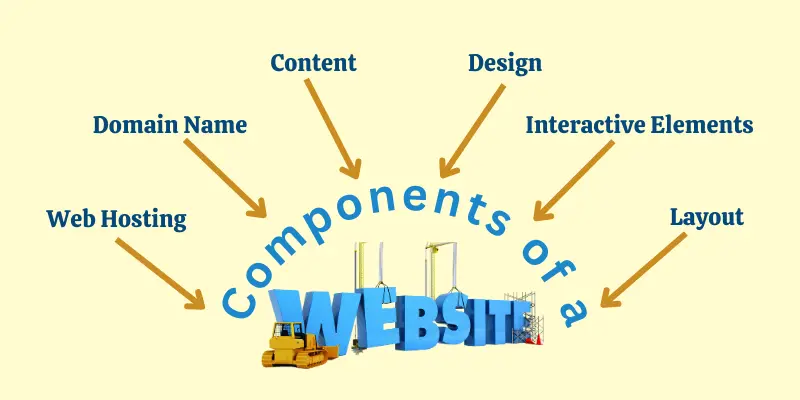
Each part plays a crucial role in how a website looks, feels, and functions
- Domain Name
- Web Hosting
- Website Content (Text, Images, Videos)
- Interactive elements
- Website Design
- Layout
1. Domain Name
It’s what people type into their web browsers to find your website. So, if your website is about computers, then your domain name might be something like “bestcomputerguide.com”. Each website has its own unique domain on the internet
2. Web Hosting
This refers to the storage space on a server that holds your website’s files, like text, images, and videos, and makes them accessible online 24/7. It’s like renting a physical space for your website to exist online. Famous examples of web hosting services include Hostinger, Bluehost, GoDaddy, and SiteGround.
3. Website Content (Text, Images, Videos)
This is the information you present to your visitors, including:
- Text: This includes articles, and other written content that conveys your message.
- Images: Photos, illustrations and other visual elements that enhance understanding and engagement.
- Videos: Tutorials, product demonstrations, or any video content that adds value to your website.
4. Interactive Elements
These are the features that allow users to engage with your website actively. It includes buttons, menus, and forms visitors use to navigate and interact with your site
- Menus: Navigation menus allow users to access different sections of your website easily.
- Buttons: Elements users like submitting forms, purchasing products, or navigating to other pages.
- Forms: These information, subscribe, contact you, or participate in various functionalities.
- Search Bars: Users can utilize these to find specific information within your website’s content.
5. Website Design
Website design is how your website looks and feels. It includes the colours, fonts, and layout that make up its appearance.
6. Layout
This refers to the structural organization of your website’s content, defining how information is presented on each page. It determines the logical flow and ease of navigation for users. A good layout makes it easy for visitors to find what they’re looking for.
Different Types of Websites
There are many different kinds of websites, and each one serves a different purpose and meets the wants of a different group of people. Here is a list of some popular types of websites:
- Educational (universities, tutorials, courses)
- News (national, local, niche)
- Informational
- Entertainment (gaming, music, streaming)
- Nonprofit (charities, NGOs, foundations)
- Personal (portfolios, blogs, resumes)
- Government
- Business
2. Transactional/eCommerce
- Retail (Amazon, eBay, speciality stores)
- Service-based (travel booking, event ticketing, freelance platforms)
- Digital Products (software, music, courses)
- Crowdfunding
3. Interactive
- Social Media (Facebook, Twitter, Instagram)
- Forums Discussion Boards
- Online Communities Membership Websites
- Gaming Websites Online Games
- Educational Websites with Interactive Elements (quizzes, simulations)
4. Other Types
- Portfolio Websites
- Event Websites
- Directory Websites
- Dating Websites
- Web Applications
- Web Services
To learn about each type of website, click here
Process of Creating a Website
Building a website may be difficult, but the process can be broken down into these simple steps:
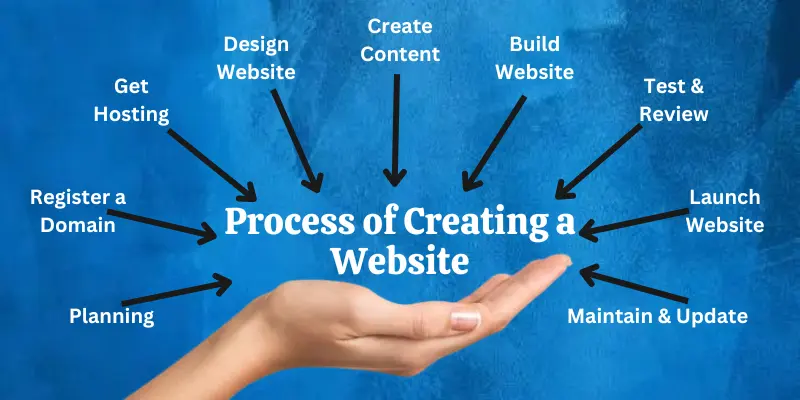
4. Design Your Website
Design the website layout and interface using wireframes or design software. Pick a good design scheme or template to make the development process faster.
5. Create Content
Develop original content, including text, images, and multimedia assets. Optimize content for search engines with SEO and ensure your content is easily accessible
6. Build Your Website
You can use programming languages like HTML, CSS, and JavaScript to build the website, or you can use a Content Management System (CMS) like WordPress. Use flexible design to make sure that your site works on all devices.
7. Test and Review
To make sure that everything works, try it thoroughly on a variety of browsers, devices, and screen sizes. Debug and fix any issues identified during testing.
How Do Websites Work?
Here’s a breakdown of how websites work in simple steps:
- User Request: You type a website address (URL) like “dgaps.com” into your web browser. This tells your browser which website you want to visit.
- DNS Lookup: The browser doesn’t understand website names directly. It uses a unique service called the Domain Name System (DNS) to translate the URL into an IP address. This IP address is a unique code identifying the specific computer where the website’s files are stored.
- Server Connection: Your browser uses the IP address to connect to the server where the website is hosted. This server acts like a digital storage box holding all the website’s files.
- Data Retrieval: Once connected, your browser sends a request to the server for the specific webpage you want to see.
- Server Response: The server receives the request, retrieves the necessary files, such as HTML code, images, and videos, and sends them back to your browser.
- Page Rendering: Your browser receives the files and interprets the HTML code. This code tells the browser how to structure and display the different elements like text, images, and buttons on your screen.
- Website Display: Finally, your browser displays the completed webpage, allowing you to see its content and interact with its features.
| Rank# | Name | Points | Team |
|---|---|---|---|
| 1 | Domenic | 88,110 | dcode |
| 2 | Sally | 72,400 | Students |
| 3 | Nick | 52,300 | dcode |
| 4 | Nick | 52,300 | dcode |
| 5 | Nick | 52,300 | dcode |
Keep in mind that this is just a brief summary. Websites can have extra steps, like using databases to make information changeable or using security protocols to ensure that communication is safe. But the core principle remains the same: your browser communicates with a server to retrieve and display the website’s content.
Advantages Disadvantages of Having a Website
Below is a list of the main advantages and disadvantages of websites.
| Benefits of Having a Website: |
|---|
|
Let us discuss some important benefits of having a good website:
|
| Drawbacks of Having a Website |
|---|
|
These are some drawbacks of a website:
|
| Black Box |
|---|
It provides the structure of a webpage using elements like headings, paragraphs, lists, and more.HTML, CSS, and JavaScript are the foundational technologies for building web pages. |
Conclusion
So, guys, I hope all your “what is website” questions have been answered. We’ve learned the definition of a website, its components and types, how to create one, how it works, and its pros and cons
The Web, also known as the World Wide Web, is a huge collection of documents and tools that can be accessed over the Internet.
Below given is the basic difference between a website a webpage.
- Website: A collection of web pages related to a specific topic or organization. It’s like a house with multiple rooms (web pages).
- Webpage: A single document within a website, displayed on your browser when you visit a website. It’s like one room in the website house.
Yes, both Google and Facebook are individual websites with their own collection of webpages. Google has pages for search, email, maps, etc., while Facebook has your profile, newsfeed, etc.


- For bold: [b]text[/b]
- For italic: [i]text[/i]
- For underline: [u]text[/u]